Camangi WebStation
Others
1. Why cannot I smoothly use G-sensor even though I have turned on the Settings→Sound & display→Orientation?
That may be caused from the heavy loading of your WebStation. Please try to close the Browser windows of Browser application. On the Browser screen, press the Menu Key and touch the Windows block to close unused windows.Or, turn off the G-sensor functionality of your WebStation and then turn on the G-sensor functionality again. Touch Settings→Sound & display→Display settings→Orientation to disable/enable the rotation orientation. If you still cannot use G-sensor smoothly after doing previous processes, please reset or restart your WebSation and try again.
2. What are the plans for supporting Android 2.0 or greater?
Currently WebStation WS171 does not support Android 2.0, but we have plan and roadmap to launch series of product for Android 2.0 or greater.
3. Does WebStation support Bluetooth?
Currently WebStation does not support the build in Bluetooth, but we have plan to support Bluetooth in the near future.
4. Can WebStation support PDF/ word /ppt viewer?
You can download these related applications which can support PDF/ word /ppt viewer from internet.
5. Does WebStation support Flash?
Currently WebStation does not support Flash due to Android's capability, but it should be a future roadmap for Android to support Flash.
6. What can I do if I forget the unlock pattern on my WebStation?
This is an.irreversible condition if you forget the unlock pattern. Please follow the Repair Policy and send your WebStation to the Camangi permitted repair parties. The Camangi permitted repair party will refurbish your WebStation to the original status under the paid-repair service.
7. Can I use WebStation to build VoIP communication?
You can download VoIP related applications which can support to communicate over Internet Protocal.
8. Can I use or set a Home screen on WebStation?
Currently WebStation provide two Launcher for your choice,including Classic Home and Modern Home.
9. Can I use Handwriting Recognition for the text input on WebStation?
Currently WebStation does not provide the Handwriting Recognition functionalities on this version.
10. What can I do if I meet screen out during the unlock process?
Please press the Menu Key twice to return to the lock screen or unlock pattern.
11. What are the WebStation product related documents included?
WebStation product related documents included as following:
1. WebStation QuickStart Guide
2. WebStation Important Product Information
3. WebStation Manual
4. WebStation FAQ
For downloading Quick Start Guide, Important Product Information and Manual, please refer to Download.
12. Can I use Google Map on WebStation?
There are 2 ways to open Google Map in Android device, after go to Http://www.google.com/mobile/ you can choose
1) View by webpage
2) View by Google Map apk. Currently WebStation support 1) View by Webpage only. And we are planning to support Google Map apk in the future launched product.
13. How can I use Webstation as a mobile phone?
WebStation does not support GSM/CDMA phone feature, this is a tablet product. But WebStation is very easy to use and perfect for VoIP service, you can download some applications like “fring.apk” to make communication via internet.
14. How can I improve the performance of WebStation?
Sometimes the performance will be effected by the running apk status, for Andorid, even you close the application, it will still running in the back. To manage apk and get better performance, we suggest you to download and install the “Task Manager,” which allows you to terminate other running applications that you are not using right now. Or you can download and install the “MemoryUp Personal.” Both of them can help WebStation to manage better performance.
You can download these apk at https://www.camangimarket.com/main.html
15. How often does WebStation update the weather information?
Weather information updates hourly when it connects to Internet or when the Weather application starts running. You can also operate "Update" feature in the application by yourself.
16. What is the difference between mini-USB port and the Standard USB port?
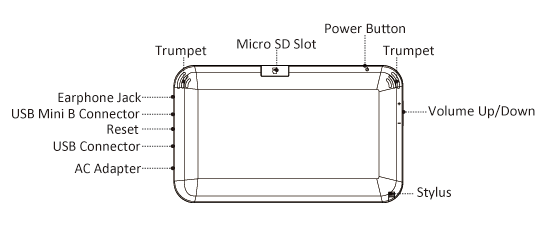
When you want to connect your PC to the WebStation, please use the mini-USB port. It can help you with transferring the data.The Standard USB port is used to allow the WebStation become a host for USB keyboard or 3G dongle.
17. Does WebStation have a hard drive?
Currently WebStation support Micro SD card storage instead of the hard drive to keep the device easy to carry.
Further, the WebStation supports from 1G~16G Micro SD card. And now any WebStation delivered complimentary with Micro SD Card.
18. How to input French,German and Spanish on WebStation?
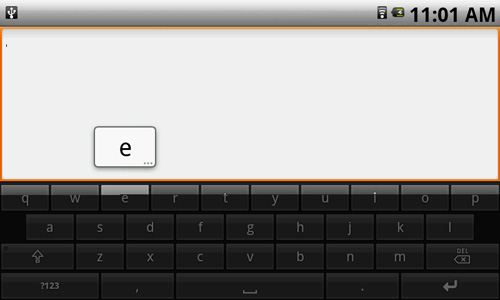
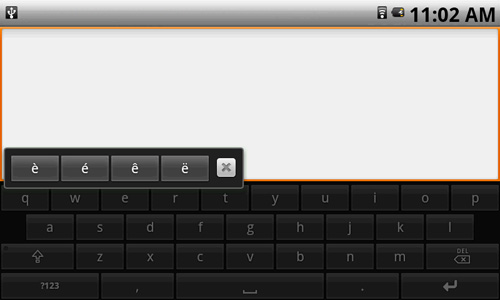
Please go to Settings -> Locale & Text, and then choose "Android Keyboard". When you want to input the alphabet, please long press the alphabet button, it will pop a window about the text list. This is an example of long press "e":
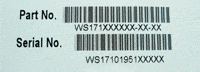
19. Where can I find the serial number?
Please open the SD card Slot cover in the back of your device, you can see the serial number on the back of the
cover.
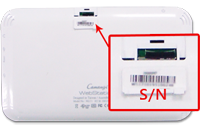
Or you can see the serial number is printed in the WebStation packing box.
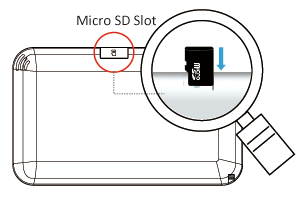
20. Where is the micro SD card?
The micro SD card is in the back of the WebStation. Please refer to below picture.
21. Where is the stylus pen?
The stylus pen is in the back of the WebStation. Please refer to below picture.